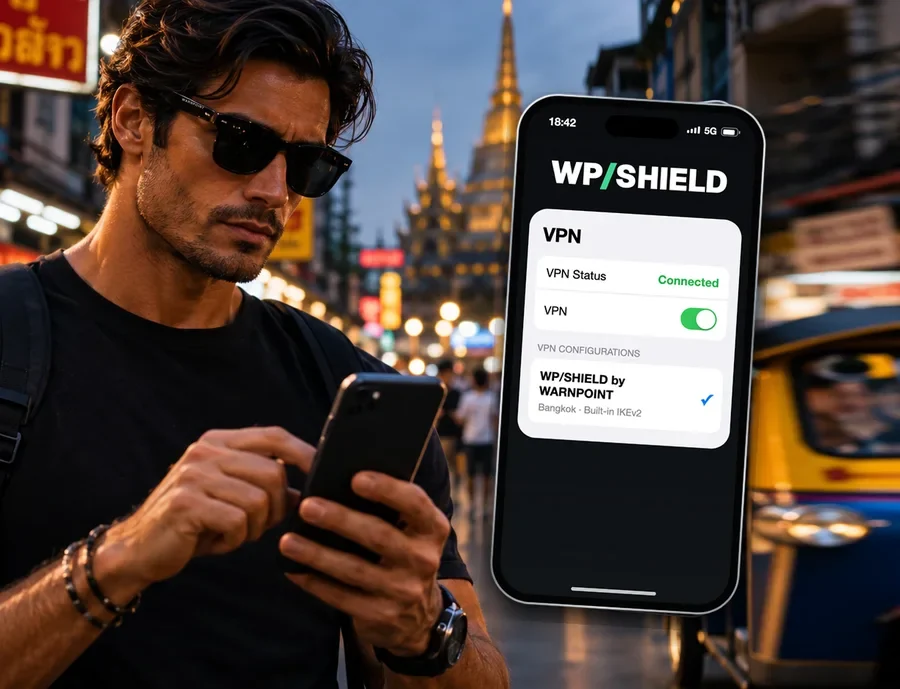
Safe on any public Wi-Fi.
Set up in one tap.
Café, airport, hotel and gym Wi-Fi are shared with strangers. WP/SHIELD encrypts everything you send, wherever you connect, and secures you abroad in countries that control internet access. No app to install: it uses the VPN already built into your phone and laptop.
Set up in one tap
No account to make anywhere else, no app, nothing to configure by hand on Apple devices.
Pick a server
Choose the server location in your WARNPOINT dashboard. Change it any time, from anywhere.
Tap Install
On iPhone, iPad and Mac it’s one tap. On Android and Windows, copy four settings into the built-in VPN menu.
Switch it on, or let it
Turn WP/SHIELD on in your device’s VPN settings, or tick Auto-connect when you install and it switches on by itself on public Wi‑Fi.
Why travelers use it
The moments on a trip when your connection is most exposed.
Hotel, airport and café Wi-Fi
Shared networks can be watched by anyone on them, and fake hotspots copy real names. With the VPN on, what you send is encrypted before it leaves your device.
Banking and email abroad
Check your bank, pay a bill or log in to email from a hotel lobby without sending it across a network you don’t control.
Turns on by itself on public Wi‑Fi
Auto-connect switches the VPN on the moment your iPhone, iPad or Mac joins a café, hotel or airport network, and skips the home or work Wi‑Fi you choose. Android has an Always-on switch. Turn it off any time.
Countries that control the internet
On networks that monitor or restrict access, your traffic is encrypted all the way to the VPN server. Some countries restrict VPN use: check local law first.
Servers worldwide, one place
Pick the server in your WARNPOINT dashboard, next to your trip’s risk level, alerts and destination brief.
Every device you travel with
Phone, tablet and laptop: up to 10 devices on one subscription, all set up from the same dashboard.
A cheap, fast VPN for public and trip Wi‑Fi
WP/SHIELD is a low-cost VPN for public Wi‑Fi at home and on trips: $7.99 a month, or $5.99 a month with Plus or Pro, and you can cancel any time. It uses IKEv2, the fast protocol already built into your devices, so there is no VPN app to download, update or open, and it reconnects quickly as you move from airport Wi‑Fi to mobile data to the hotel network.
Use it as a secure VPN for public Wi‑Fi, a VPN for hotels and airports, or a simple VPN for your phone while you are abroad. Pick a server near you for speed, or in another country when you need to. Planning a trip? The Trip Kit adds Trip Watch alerts and a destination brief to your first month for $12.99.
Servers in many countries
Every WP/SHIELD location, by country. Pick one in your WARNPOINT dashboard and change it any time: the new server replaces the old one on your device.
Part of your trip, not another app
WP/SHIELD sits with the rest of WARNPOINT’s travel tools.
Questions
Is WP/SHIELD a cheap VPN?
It is a low-cost VPN: $7.99 a month on its own, or $5.99 a month as an add-on to Plus or Pro, with no long contract to sign. Cancel any time.
Is WP/SHIELD a fast VPN?
It uses IKEv2, the protocol built into iPhone, iPad, Mac, Android and Windows, which is quick to connect and reconnects fast when you move between Wi‑Fi and mobile data. Speed also depends on the server you pick and the network you are on; choose a server close to you for the fastest connection.
What makes a good VPN for travel?
Something you can set up before you leave and switch on in a second at the airport or hotel: encrypted connections on public Wi‑Fi, servers in several countries, and nothing extra to install. That is what WP/SHIELD is built for.
Can I use a VPN without installing an app?
Yes. WP/SHIELD uses the VPN that is already part of your phone or laptop. On Apple devices you install it with one tap; on Android and Windows you add it in the VPN settings.
Do I need to install an app?
No. WP/SHIELD uses the VPN that is already built into your device. On iPhone, iPad and Mac you tap Install once; on Android and Windows you copy four settings into the built-in VPN menu.
How do I set it up?
Start WP/SHIELD, open My dashboard, pick a server and tap Install (iPhone, iPad, Mac) or copy the settings shown (Android, Windows). Then switch it on in your device’s VPN settings. It takes about a minute.
Can I change server?
Yes, any time, in My dashboard. Pick another server and install again: the new one replaces the old one on your device.
Can it turn on automatically?
Yes. When you install it on iPhone, iPad or Mac, leave Auto-connect on Wi‑Fi ticked: the VPN switches on by itself whenever you join a Wi‑Fi network, except the home or work networks you name. You can add mobile data too. On Android, turn on Always-on VPN in the VPN settings. You can still switch it off any time.
Can I turn it off and on?
Yes. Use the VPN switch in your device’s settings (on iPhone, near the top of Settings). It stays the way you leave it.
How many devices can I use?
Up to 10 devices on one subscription.
Is it legal to use a VPN everywhere?
No. Some countries restrict or ban VPN use, and some block VPN connections. Check local law before you travel; WARNPOINT’s travel safety pages are a good place to start.
Does a VPN make me anonymous?
No. A VPN encrypts your connection and hides your traffic from the local network you are on. It does not make you anonymous, protect a device that is already compromised, or make anything legal that is not.
How much does it cost and can I cancel?
$7.99 a month, or $5.99 a month as an add-on to Plus or Pro. Planning a trip? The Trip Kit is $12.99: Trip Watch, the destination brief and your first month of WP/SHIELD. Cancel any time in My dashboard; it stays on until the end of the month you paid for.
$7.99 a month. One tap to set up. Cancel any time.